
Monthly storage fees make it into most budgets. Placement fees usually do too. Low inventory fees rarely do, because they do not look like a separate bill. When the fee applies, Amazon adds it to your FBA fulfillment fees. So it blends into a cost you already expect to pay.
We still group it with the storage-side fees. It is driven by how much inventory you hold, not by how you pack or ship. And the fix lives where most storage fixes live: your reorder cadence.
How low inventory fees work: the 28-day rule
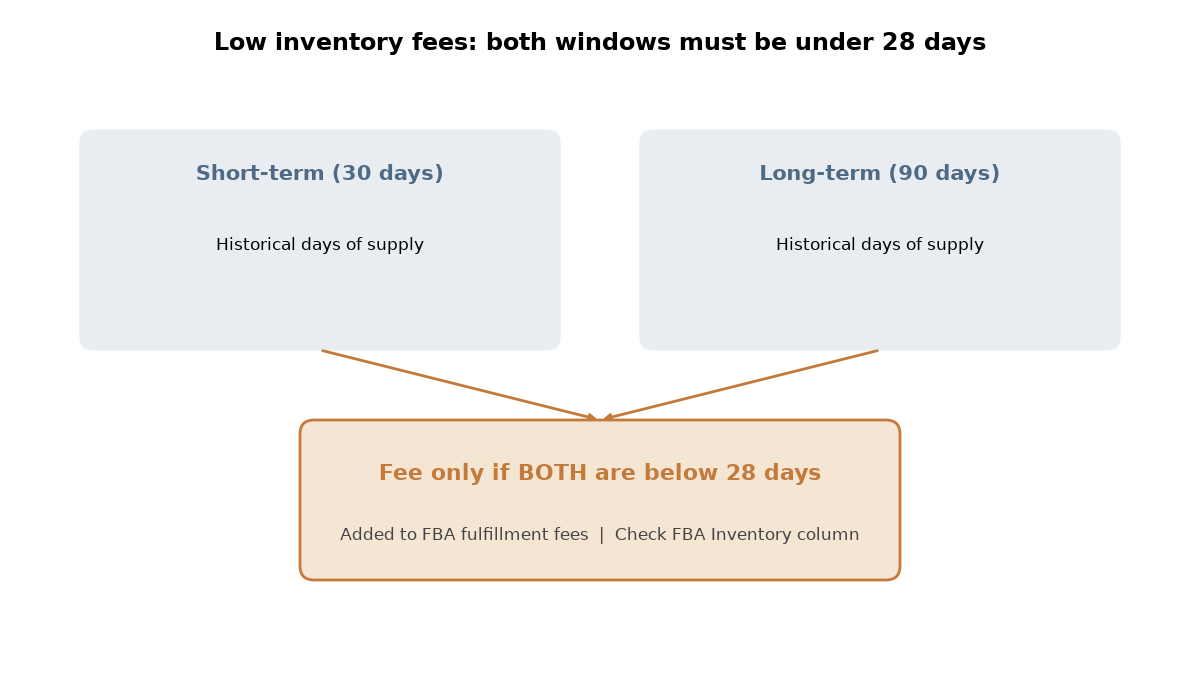
Amazon bases this fee on historical days of supply, as explained in Seller Central. That compares your inventory to what you actually sold, not to a forecast.
It looks at two windows:
- Short-term: the last 30 days.
- Long-term: the last 90 days.
The fee applies only when both numbers are below 28 days. If one window dips under 28 and the other stays above it, there is no fee.
A few other details matter:
- Since January 15, 2026, it is calculated for each seller SKU (FNSKU), not at the parent level. So one thin variation can be charged even when its siblings are well stocked.
- When it triggers, it is added to your FBA fulfillment fees.
- The amount is tiered by days of supply and size. Check current rates in Seller Central.
Size affects eligibility, too. Amazon first described the fee as applying to standard-size products. Since January 15, 2026, it also applies to Small Bulky and Large Bulky products. If you sell bulky items, do not assume you are exempt. Confirm current eligibility in Seller Central and in Fee Preview.
Where to see it
Open the FBA Inventory page and find the “Historical days of supply” column. That is the number Amazon uses.
Who is exempt
Amazon has stated these waivers and exclusions:
- New Professional sellers, for 365 days after their first inventory is received.
- New-to-FBA parent products enrolled in FBA New Selection, for the first 180 days after their first inventory-received date.
- Products auto-replenished by AWD. A later clarification set the bar at SKUs where 70% or more of inventory was auto-replenished through AWD over the prior 90 days.
Why a 60-day lead time breaks you if you reorder late
Brands that import from Asia live with long lead times. We plan around about 60 days from purchase order to FBA: roughly 30 days of production and 30 days of shipping.
That changes how you should read the 28-day line. Once a SKU shows under 28 days of supply, a new order cannot arrive in time. Stock you order that day is about two months out.
So the reorder trigger cannot be the fee threshold. It has to be the lead time. In practice, that means placing the PO while on-hand plus inbound inventory still covers about 60 days of sales.
The two-window rule explains why this works. A short dip in the 30-day number alone does not trigger the fee. Trouble starts when low stock lasts long enough to pull the 90-day number under 28 as well. Steady cadence keeps dips short. Late reorders stretch them out.
Here is one industry example. A brand selling a bulky absorbent item ran into low inventory fees. Those fees were resolved by June 2026, after a restock brought its inventory back to a healthy level. In other words, the fee tracked the stock level.
We’d treat 60 days as the latest point to order, not the target. Production slips and port delays happen, so we’d plan a buffer above it rather than ordering right on the line.
Worked example: units needed for 28+ days of supply
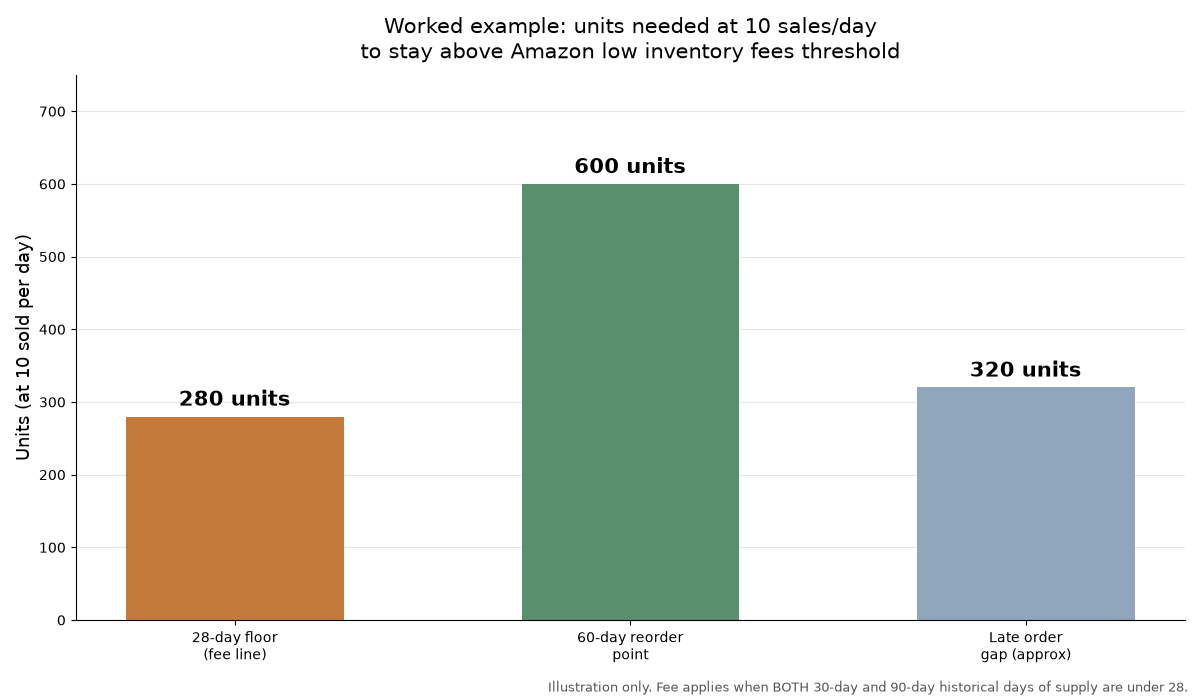
This is an illustration. The numbers show the math. They do not come from a real product.
Say a SKU sells 10 units a day on average.
- The floor. 28 days at 10 units a day is 280 units. To stay above the line, you need more than 280 sellable units in FBA on average.
- The lead time. About 60 days: 30 to produce and 30 to ship.
- The reorder point. 60 days at 10 units a day is 600 units. So the PO goes out as on-hand plus inbound approaches about 600 units, with your buffer on top.
Next, look at the late version. Suppose you wait until FBA shows about 280 units, right at the 28-day line. At 10 a day, those units last about 28 days. The new order is still about 60 days away. That leaves roughly 32 days with nothing to sell.
Do that once and the 30-day number drops under 28. Make it a habit and the 90-day number follows. Then low inventory fees apply, on top of the sales you lost while out of stock.
Ordering at the 600-unit mark, plus a buffer, means the next shipment lands before the shelf runs thin. That is the whole point of cadence.
Brand transitions and other blockers
Cadence only works if restocks can move. Some events stop them even when the math is right.
Brand transitions
Moving the same ASINs from an old brand name to a new one is a risk pattern worth planning for. While the change settles, restocks can get blocked. Meanwhile, sales keep drawing inventory down. Because of that, a rebrand can bring back low inventory fees on a SKU that had been clear.
So we’d build coverage before the transition starts, then watch days of supply closely until restocks flow normally again.
Late containers and expired bonds
Lead time is a plan, not a promise. A late container or a production slip stretches 60 days into something longer. An expired customs bond can hold freight until it is renewed. That is why we’d keep the buffer, and why we’d confirm bond status before a container ships.
What we’d check every week
This is the weekly routine we’d run to keep low inventory fees off the bill.
The Historical days of supply column
Check both the short-term and long-term numbers for every SKU. Flag any SKU where either one is trending toward 28. One window under 28 is a warning. Both under 28 is a fee.
The AWD auto-replenishment waiver
If you use AWD, check whether each SKU actually qualifies against the 70% bar. Units sent to FBA straight from the factory or a 3PL are not AWD auto-replenishment. So a mixed inbound plan can drop a SKU below that share without anyone noticing.
PO timing
Compare on-hand plus inbound coverage against the 60-day lead time for every SKU. Do this even if you reorder by product. If any SKU is nearing 60 days of coverage and no PO is open, place it this week. Then confirm fee eligibility in Fee Preview, especially for bulky items.
The other side: overstock
Holding extra stock to dodge the fee is not free. Too much inventory brings storage fees and the aged inventory surcharge. The goal is a steady band, not a pile.
For example, in January 2026 one brand spent 3.86% of revenue on storage plus inbound, compared with 4.07% a year earlier. Its long-term storage fees dropped from $1,020 to $20. That is a storage number, not a low-inventory number. However, it reflects the same idea: stock sized to sales.
Get our free Q1 FBA Inventory Checklist: what to clean up January through March so last season’s leftovers do not eat into this year’s margin.
Form not showing? Get the Q1 checklist here.
Get a second look at your storage-side fees
If low inventory fees, storage fees, or placement fees keep showing up in your reports, a second look helps. We plan FBA, AWD, and 3PL inventory and restock timing for private-label brands, and one of our co-founders sells on Amazon himself.
Related guides: Amazon inbound placement fee lesson, Amazon AWD vs FBA, How to request more FBA capacity, How to save money on Amazon shipping and warehousing, and how the free storage costs audit works.
Book your free Storage Costs Audit and we’ll go through your storage-side fees with you, low inventory fees included.